Thunderbird is an Email Client Software and you can work with it in the following way.
1. Open Mozilla Thunderbird.
2. In the left panel you can see a list of your email accounts. Double Click on "Inbox" or if its hidden, click on your email, and it will expand and show the inbox, the trash list. etc. 
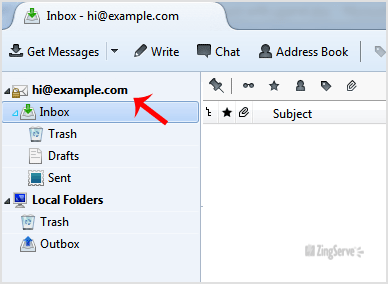
Anther option is to right click on the email and click on "Get Messages".
Thunderbird also automatically checks email every 5 to 10 minutes. It also automatically checks mail when you open the program.

Categories
Backup/Restore
4
Billing & Accounts
7
cPanel - Control Panel
77
Databases
22
DNS - Nameserver
6
Domain Management
14
Email
100
FTP Questions
42
Installing a Control Panel
6
Others
3
Pre-sales Questions
9
Scripts & Applications
106
Security
18
SiteWorx (Control Panel)
60
SolusVM
19
SSL
5
Troubleshooting
4
Categories
Tag Cloud
How to check for new email in Mozilla Thunderbird? Print
- 0
Was this answer helpful?
Related Articles
Configuring a POP email account with SSL in Thunderbird
Configuring a POP email account with SSL in ThunderBirdThis demo assumes you've already opened...
Configuring a POP email account in Thunderbird
Configuring a POP email account in ThunderBirdThis demo assumes you've already opened...
How to delete an email account in Thunderbird
This demo assumes you've already opened ThunderBird.Right click on your account name.Please click...
Creating a signature in Thunderbird
Creating a signature in ThunderBirdThis demo assumes you've already opened ThunderBird.Right...
Configuring custom ports in Thunderbird
Configuring custom ports in ThunderBirdThis demo assumes you've already opened ThunderBird.Right...